
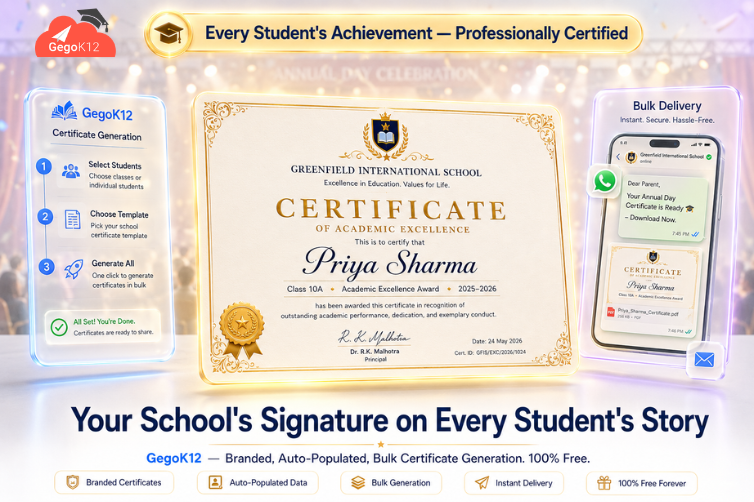
The best free digital certificate generation software for schools in 2026 is GegoK12’s Certificate Generation Module — a 100% free, open-source tool built into the GegoK12 school ERP. Schools use it to create custom-branded certificate templates, auto-populate student data, generate individual or bulk certificates in one click, store them securely in the cloud, and deliver them via email — covering Transfer Certificates, merit awards, sports achievements, participation certificates, attendance awards, and more.
Why This Guide Exists
Picture the last time your school hosted an Annual Day. Hundreds of students received certificates for academics, sports, cultural performances, and attendance. Meanwhile, someone in the office spent three days manually typing each student’s name onto a template, printing every certificate individually, having them signed by the principal, and sorting them into labelled envelopes — only for two students to receive someone else’s certificate on the night.
That scenario plays out in schools across India every single term. Moreover, it is entirely unnecessary in 2026.
This guide answers every real question school administrators ask before switching to digital certificate generation — using GegoK12’s Certificate Generation Module as the reference point. Each answer is direct, specific, and built around how the system actually works.
Q1: “What types of certificates can our school actually generate using GegoK12?”
This is almost always the first question — and the answer surprises most administrators.
GegoK12’s Certificate Generation module handles every certificate type a K-12 school regularly issues. Specifically, it covers:
Academic Achievement Certificates — merit awards, subject toppers, rank certificates, and academic excellence recognition for individual students or entire classes.
Transfer Certificates (TCs) — one of the most critical documents a school issues. Furthermore, GegoK12 auto-populates TC content directly from the student’s profile in the Student Information Management module — pulling academic records, attendance percentage, conduct grade, and admission details without manual typing.
Participation Certificates — for sports days, science fairs, cultural events, inter-school competitions, and quiz events. Consequently, what previously took hours of individual name entry becomes a bulk generation task completed in minutes.
Attendance Award Certificates — recognising students who maintain outstanding attendance throughout a term or year, triggered automatically from the Attendance Management module.
Sports Achievement Certificates — with customisable fields for event name, position secured, and date of competition.
Completion and Course Certificates — for students who complete specific academic programmes, online learning modules via the Video Lecture Room, or quiz achievement milestones through the Online Quiz Module.
In short, if your school issues it as recognition of achievement or completion, GegoK12 generates it — branded, accurate, and professionally formatted.
Q2: “How does the system know each student’s details? Does someone have to type them in?”
Nobody types anything manually. This is perhaps the most important distinction between GegoK12and a generic certificate design tool.
GegoK12 pulls all student data automatically from the school’s existing records. Specifically, the module connects to the Student Information Management module — which already holds every student’s name, class, section, roll number, date of birth, academic performance, attendance record, and parent details.
When an administrator generates a batch of merit certificates for Class 10, therefore, the system populates each certificate with the correct student name, class, score, and rank — automatically. Moreover, it applies the school’s configured certificate template with the school logo, seal, and principal’s digital signature already embedded.
As a result, a batch of 500 personalised certificates that previously required three days of manual data entry now takes under 10 minutes to generate — with zero typos, zero wrong names, and zero mismatched certificates.
💡 Why This Matters Beyond Convenience: Every manual data entry point is a potential error. Furthermore, in the context of Transfer Certificates — legal documents relied upon by receiving institutions — errors create serious administrative and reputational consequences. GegoK12 eliminates this risk by sourcing directly from verified school records.
Q3: “Can we make certificates look like they actually come from our school — not a generic template?”
Absolutely — and this is one area where GegoK12 invests significant flexibility.
The template editor lets administrators design certificates that fully reflect the school’s visual identity. Specifically, schools upload and configure:
- School logo and crest — positioned according to the school’s standard certificate layout
- Official school seal — embedded digitally for authenticity
- Principal’s digital signature — pre-loaded so every certificate carries the appropriate authorisation without requiring the principal to sign hundreds of pages
- Custom fonts, colours, and borders — matching the school’s established visual brand
- Custom fields — event name, academic year, stream or subject, and any school-specific data points
Furthermore, schools create multiple templates for different certificate types — a formal Transfer Certificate template, a celebratory sports achievement design, a clean academic merit layout — and save each one for reuse across future events.
Consequently, every certificate the school issues looks professionally produced, consistently branded, and unmistakably institutional — regardless of whether it was generated for 1 student or 1,000.
Q4: “We have 300 students receiving participation certificates after Sports Day. How long does bulk generation actually take?”
With GegoK12, generating 300 personalised, branded sports day participation certificates takes approximately 4 to 7 minutes.
Here is how the process works in practice:
First, the administrator selects the relevant student group — Class 6 to Class 12, or a specific event participant list. Next, they choose the Sports Day Participation template. Then they click “Generate Certificates.”
Meanwhile, the system retrieves each student’s name and details from the database, populates the template individually for each student, applies the digital signature and school seal, and creates a numbered, archived digital record for every certificate issued.
Finally, the administrator reviews a preview batch, confirms, and either downloads them as a ZIP of individual PDFs or sends them directly to students and parents via email — all in one action.
As a result, the process that once consumed an entire staff member’s Tuesday and Wednesday is handled before lunch on Monday.
📊 Time Saved Per Year: A school issuing certificates for three major events per term — four terms per year — saves approximately 40–60 staff hours annually by switching from manual to GegoK12’s automated generation. That time translates directly into more productive administrative capacity.
Q5: “Where do the generated certificates go? How do we find them again six months later?”
GegoK12 maintains a complete, searchable digital issuance log for every certificate the school generates.
Each log entry records the student’s name, class, certificate type, date of issue, template used, and current status (generated, sent, downloaded). Consequently, when a parent calls six months after Annual Day asking for a duplicate merit certificate their child lost, the administrator searches the student’s name — and the original certificate appears in under 30 seconds.
Moreover, all certificates reside in secure cloud storage — encrypted, backed up, and permanently accessible. Unlike a physical printing room where certificates get damaged, misplaced, or lost in reorganisation, the digital archive preserves every certificate the school has ever issued — indefinitely.
Furthermore, because GegoK12 can be self-hosted, the school’s certificate archive lives on its own server. This means no third-party platform holds sensitive student achievement records, and data sovereignty remains entirely with the institution.
Q6: “Can we control who in the school is allowed to generate and issue certificates?”
Yes — and this control is more granular than most administrators expect.
GegoK12 enforces role-based access permissions across the certificate module. Specifically:
- Exam controllers and senior administrators can generate and issue all certificate types, including Transfer Certificates and academic merit awards
- Event coordinators can generate participation certificates for their specific events but cannot access TC issuance
- Class teachers can view certificate records for their own class but cannot create or modify certificates without appropriate authorisation
- General staff have no access to the module unless explicitly granted permissions
As a result, the risk of unauthorised or incorrectly issued certificates — a real concern with sensitive documents like TCs — is effectively eliminated. Moreover, the digital issuance log records which staff member generated each certificate and when, creating a complete audit trail for every document the school produces.
Q7: “Is this really free? What is the catch?”
There is no catch. GegoK12 is a free and open-source school management system built on PHP + Laravel and released under the MIT licence.
The Certificate Generation module is included in the platform at no cost. Schools that self-host the system pay no licensing fees — not monthly, not annually, and not per certificate generated. The full source code is available on GitHub for any school or developer to deploy, inspect, and customise.
For schools that prefer not to manage their own hosting, GegoK12 offers optional managed hosting plans. However, even in that case, the software itself carries no licensing cost — the charge covers infrastructure and support, not the platform.
In 2026, a free, open-source, fully integrated digital certificate system is not a compromise. It is a smarter choice than paying annually for a standalone tool that connects to none of the school’s other systems.
Q8: “How does GegoK12’s certificate module compare to using Canva or a design tool?”
This question deserves an honest, direct comparison.
| Factor | GegoK12 Certificate Module | Canva / Design Tools |
|---|---|---|
| Student data entry | ✅ Automatic from school records | ❌ Manual typing every time |
| Bulk generation (300+ certs) | ✅ Minutes | ❌ Hours of mail-merge workarounds |
| School ERP integration | ✅ Fully connected | ❌ No connection |
| Searchable issuance log | ✅ Permanent digital archive | ❌ No record system |
| Role-based access control | ✅ Yes | ❌ No |
| Tamper-proof digital records | ✅ Cloud-secured, school-hosted | ❌ File on someone’s desktop |
| Cost | ✅ Free | ❌ ₹4,000–₹15,000/year |
| TC auto-populated from SIS | ✅ Yes | ❌ No |
| Email delivery | ✅ Built-in | ❌ Manual export and send |
| Audit trail | ✅ Complete log | ❌ None |
Design tools like Canva are excellent for creating templates visually. However, they are not certificate management systems. Furthermore, they require someone to manually type every student’s name, manually export each certificate, and manually track what has been issued and to whom. GegoK12 automates all of that — while also producing certificates that look equally professional.
What Does GegoK12 Certificate Generation Look Like on Annual Day?
Here is a concrete walkthrough of how a school uses the module for its biggest recognition event of the year.
Two weeks before Annual Day, the administrator opens GegoK12’s Certificate module. She selects “Create New Template” and designs the school’s Annual Day merit certificate — uploading the school crest, choosing the gold-border design, and setting the principal’s digital signature. She saves it as “Annual Day Merit 2026.”
One week before, she imports the event participant and winner list via CSV. The system cross-references every name against the student database. As a result, the student data auto-populates into each certificate field — no manual typing required.
Three days before Annual Day, she clicks “Generate All Certificates.” In 8 minutes, the system produces 247 individually personalised, branded PDF certificates. Moreover, each one carries a unique certificate number, the event name, the student’s achievement category, and the school’s digital seal.
The evening before, she uses the bulk email feature to send each student their certificate digitally — parents receive it on their phones before the event even begins. Physical copies, printed from the PDFs by the office staff, serve as the ceremonial presentation versions.
Six months later, a student asks for a duplicate certificate because they lost theirs. The administrator searches the student’s name in the issuance log, finds the original in 15 seconds, and resends it by email. No reprinting. No reconstruction. No problem.
How the Certificate Module Connects to the Rest of GegoK12
A certificate is only as credible as the data behind it. Consequently, GegoK12 builds certificate generation on top of verified, live school records — not manually entered data.
- Student Information Management — supplies all student personal and academic data for auto-population
- Attendance Management — triggers attendance award certificates automatically for qualifying students
- Exam Scheduling & Result Generation — merit certificate generation links directly to verified exam results
- Online Quiz Module — outstanding quiz performers receive achievement certificates automatically
- Video Lecture Room — course completion certificates issue upon programme conclusion
- School Library Management — reading achievement certificates recognise top library users
- Alumni Management — graduating students receive completion certificates archived in alumni records
- Fee Management System — fee clearance certificates generate automatically for students with zero outstanding dues
- SMS / Push Notifications — certificate availability notifications reach students and parents instantly
- Private Chat Module — administrators communicate certificate queries and requests securely within the platform
Who Benefits Most — and How
School Principals gain a professional certificate system that reflects their institution’s credibility without requiring personal involvement in every batch. Moreover, the digital signature feature means the principal’s authority appears on every certificate without the principal signing a single physical page.
Exam Controllers and Academic Coordinators save days of work every term. Furthermore, they eliminate the anxiety of manually checking each certificate for data accuracy — because GegoK12 pulls verified data automatically.
Event Organisers and Activity Coordinators handle large-batch participation certificates for sports days, science fairs, and cultural events in minutes rather than days. Consequently, their energy goes into the event itself — not the paperwork that follows it.
Students and Parents receive their certificates digitally and immediately — not two weeks after the event when the physical copies finally get distributed. Additionally, duplicate requests are resolved in minutes rather than requiring a reprint from scratch.
IT Teams and Developers work with a fully open-source codebase on GitHub, allowing them to extend the module with digital verification QR codes, blockchain-based certificate authenticity, or custom certificate portal access for alumni.
Getting Started: Your Practical Implementation Checklist
Before your next event, term, or academic year, work through these steps to have GegoK12’s Certificate Generation module fully operational.
- Step 1 — Get the code. Fork or download the GegoK12 GitHub repository. MIT licensed, zero cost.
- Step 2 — Read the setup guide. The official GegoK12 documentation covers template configuration, role-based permissions, bulk generation setup, and email delivery integration.
- Step 3 — Watch the tutorial. The GegoK12 YouTube tutorial playlist includes a complete walkthrough of the certificate generation module — from template creation to bulk issuance and email delivery.
- Step 4 — Design your first template. Upload your school logo, principal signature, and seal. Create one merit certificate template. This investment takes 20 minutes and you reuse it every term indefinitely.
- Step 5 — Book a free demo. The GegoK12 team runs a live demo session specifically showing bulk certificate generation in action. Watch 300 certificates generate in real time before committing to deployment.
- Step 6 — Generate your first batch. Pick your next event — a quiz competition, a sports day, or an exam result cycle. Run the batch through GegoK12 and compare the experience against your current process.
The Questions Schools Ask After Going Live
“We issued a certificate with an error. How do we fix it?” Administrators void the original certificate in the issuance log and generate a corrected version. Moreover, the system records the revision with a timestamp, maintaining a clean audit trail of the correction.
“Can students download their own certificates?” Yes. Students access their certificates through the GegoK12 student dashboard — viewing, downloading, and sharing their certificates at any time without contacting the school office.
“What happens when a student leaves and requests their TC years later?” The TC remains in the permanent digital archive. Consequently, a student who left in 2023 and requests a duplicate TC in 2028 receives it within minutes — because the system never deletes issued documents.
“Does the system work for co-curricular and non-academic certificates too?” Absolutely. Furthermore, the template system accommodates completely custom certificate designs — meaning sports achievements, cultural event participation, community service recognition, and school club memberships all fall within the module’s scope.
Final Thought: A Certificate Is Your School’s Signature on a Student’s Story
Every certificate a school issues carries its name, its seal, and its credibility. When that certificate arrives late, contains a typo, or goes to the wrong student — it diminishes the achievement it was meant to celebrate. Conversely, when it arrives within 24 hours of the event, carries the student’s verified name and achievement, and looks professionally produced — it amplifies the school’s reputation alongside the student’s pride.
GegoK12’s Digital Certificate Generation Module makes the second outcome the default — automatically, consistently, and completely free.
In 2026, every school’s certification process should reflect the same standard of excellence the school holds its students to. GegoK12 makes that standard achievable for every institution, regardless of size or budget.
🚀 Ready to Issue Your First Digital Certificate?
| What You Want | Where to Go |
|---|---|
| 📂 Free source code | GegoK12 on GitHub |
| 📖 Setup guide | Official Documentation |
| 🎥 Video walkthrough | GegoK12 YouTube Playlist |
| 🖥️ Full platform overview | Free Open Source School ERP |
| 🎓 Live bulk generation demo | Book Your Free Demo Session |