
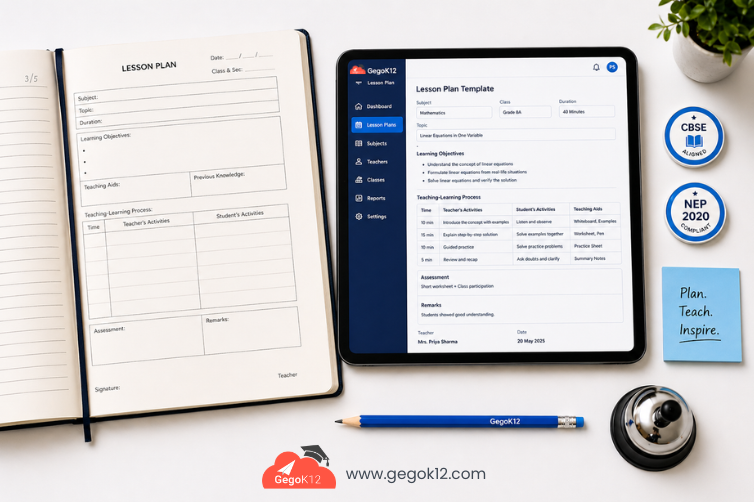
School lesson plan management software is a digital tool that helps teachers create, organize, track, and share structured lesson plans aligned to curriculum standards — eliminating manual paperwork and ensuring consistent teaching quality across every classroom.
Why Schools Urgently Need Lesson Plan Management Software
Teachers are the backbone of every school — yet most still spend 8 to 12 hours each week writing, revising, and filing lesson plans manually. Across a school of 30 teachers, that is over 300 hours of productive teaching time lost every single week to administrative work that software can handle in minutes.
The demand for school lesson plan management software has grown sharply in 2025, driven by curriculum reforms, NEP 2020 implementation in India, and growing pressure on academic coordinators to ensure teaching quality across all classes and subjects. Schools that continue relying on handwritten planners, scattered Word documents, or email chains to manage lesson plans face increasing risk of curriculum gaps, inconsistency, and compliance failures during inspections.
A structured digital solution does not just save time — it builds institutional knowledge, supports teacher accountability, and gives school leadership real visibility into what is being taught, when, and how effectively.
What Is a School Lesson Plan Management Software?
At its core, a school lesson plan management software provides teachers with a centralized platform to design, submit, and archive structured lesson plans. Beyond individual planning, it connects each lesson to the academic calendar, links plans to specific classes and subjects, and gives academic coordinators visibility across the entire school’s teaching schedule.
The best systems do more than just store documents. They integrate lesson plans directly into the broader school management ecosystem — connecting attendance, homework assignments, exam schedules, and student performance data into one coherent picture of academic progress.
GegoK12’s open-source school management platform includes a dedicated Lesson Plan Module built precisely for this purpose — and because it is released under the MIT License, schools can adopt it without any licensing fees or vendor dependency.
5 Critical Problems Solved by Digital Lesson Planning
1. Eliminating Curriculum Gaps
Without centralized lesson tracking, it is common for chapters to be skipped, repeated, or rushed at year-end. Digital lesson plan management maps every topic against the syllabus timeline, giving coordinators an instant view of curriculum coverage across all classes.
2. Supporting Substitute Teachers
When a teacher is absent, substitute teachers often have no idea what was covered or what comes next. A digital system gives any authorized staff member immediate access to current lesson plans, ensuring continuity without a single phone call.
3. Enabling Academic Reviews
School principals and academic heads need to review teaching quality without sitting in every classroom. With school lesson plan management software, reviewers can evaluate plan structure, learning objectives, teaching methods, and assessment strategies from a single dashboard.
4. Aligning with Board Requirements
CBSE, ICSE, and State Board schools in India are frequently inspected for teaching documentation compliance. Digitally filed lesson plans with timestamps, submission records, and syllabus alignment evidence provide instant inspection readiness.
5. Building Long-Term Institutional Knowledge
When experienced teachers leave, their best lesson plans leave with them — unless they are stored in a centralized digital system. Lesson plan software creates a permanent institutional library that grows more valuable with every academic year.
Key Features to Look for in Lesson Plan Software
When evaluating school lesson plan management software, prioritize these capabilities:
Structured Plan Templates — Pre-defined formats with fields for learning objectives, teaching methods, resources, assessments, and time allocation. Consistency across the institution improves both quality and reviewability.
Subject and Class Mapping — Each plan should be linked to a specific subject, class, section, and academic week, making it easy to track coverage at a granular level.
Coordinator Review Workflow — A submission and approval workflow where teachers submit plans for coordinator review before the teaching week begins.
Calendar Integration — Lesson plans should align with the school’s academic calendar, automatically accounting for holidays, exam weeks, and events.
Mobile Access — Teachers need to access and update plans from mobile devices, not just desktop computers. Look for platforms with dedicated school mobile applications that support lesson plan access on the go.
Homework and Assignment Linkage — When a lesson plan is created, the system should allow direct linking to homework assignments, ensuring students receive aligned reinforcement tasks.
Audit Trail — Timestamped records showing when plans were created, submitted, reviewed, and updated — critical for compliance and accountability.
How GegoK12’s Lesson Plan Module Works
GegoK12’s Lesson Plan Module is built directly into its comprehensive school management module ecosystem, making it one of the most integrated free solutions available today.
Here is how the workflow functions in practice:
Week 1 — Template Setup: Academic coordinators configure plan templates aligned to CBSE, ICSE, or State Board formats. Subject-specific formats can be created for science labs, language classes, physical education, and more.
Ongoing — Teacher Plan Submission: Teachers log in through the web interface or mobile app, select their class and subject, and complete structured lesson plans for the upcoming week. Plans are submitted digitally for coordinator review.
Review and Approval: Academic heads review submitted plans, add comments or return for revision, and approve finalized plans. This workflow replaces the inefficient practice of printing and physically signing paper planners.
Real-Time Reporting: School management can pull reports showing which teachers have submitted plans on time, which chapters have been covered, and where syllabus gaps exist — in real time, without waiting for end-of-term reviews.
Because GegoK12 is fully self-hosted and open source, schools maintain complete ownership of all lesson plan data. The platform is available for download on GitHub, and full setup guidance is available through the official documentation portal.
Implementation Guide: Getting Started in 4 Weeks
Week 1 — Platform Setup Deploy GegoK12 on your school server or cloud environment. Configure academic year, subjects, classes, and staff accounts. Review the video tutorial library for module-specific setup guidance.
Week 2 — Template Configuration Work with academic coordinators to design lesson plan templates that match your board requirements. Create subject-specific formats where needed.
Week 3 — Teacher Training Conduct hands-on training sessions for teaching staff. Focus on mobile app usage to ensure adoption across all age groups of staff. Establish submission deadlines and review timelines.
Week 4 — Go Live Launch the system for the next academic week. Monitor submission rates, collect teacher feedback, and refine workflows based on real usage.
India-Specific Advantages
For Indian schools operating under CBSE, ICSE, or State Board systems, GegoK12’s lesson plan management offers specific advantages:
- NEP 2020 Alignment — Supports competency-based lesson planning frameworks introduced under National Education Policy 2020
- Regional Language Support — Teachers can document plan content in Hindi and regional languages alongside English
- Offline Resilience — Core plan access functions even in low-connectivity environments common in Tier 2 and Tier 3 towns
- Zero License Cost — Eliminates the ₹50,000–₹2,00,000 annual software licensing costs charged by proprietary lesson planning platforms
Frequently Asked Questions
Q: How is school lesson plan management software different from a regular planner?
A digital system provides structured templates, coordinator workflows, syllabus tracking, mobile access, and reporting — capabilities that no paper planner or generic document tool can offer.
Q: Can lesson plans be shared between teachers for the same subject?
Yes. GegoK12 allows plans to be shared across teachers handling the same subject in parallel sections, creating consistency and reducing duplication of effort.
Q: Is GegoK12’s Lesson Plan Module free to use?
Yes. GegoK12 is released under the MIT License, making the entire platform including the Lesson Plan Module completely free for schools to download, use, and customize.
Q: How long does it take to implement the Lesson Plan Module?
Most schools complete initial setup within 2 weeks and achieve full adoption within 4 to 6 weeks with proper training.
Conclusion: Build a Culture of Structured Teaching
Adopting school lesson plan management software is not simply a technology upgrade — it is an investment in teaching quality, curriculum integrity, and institutional accountability. When every teacher plans consistently, every coordinator reviews effectively, and every lesson aligns to the syllabus, student outcomes improve measurably.
GegoK12 offers schools a comprehensive, free, and fully self-hosted solution that integrates lesson planning into every other dimension of school management — from attendance and homework to exams and reporting.
Explore the full GegoK12 platform or contact the GegoK12 team to begin your implementation journey today.