
Home / Modules / Admissions management
Free module · included in the MIT-licensed coreSchool admission management software
GegoK12 admissions management is free, open source school admission software for K-12 schools. Open admissions for the year and it publishes a public application link for the school website. Families apply, pay the application fee, upload their documents and are approved in the same system — and an admitted applicant becomes a student, with an enrollment number and mobile app logins, without anyone retyping anything. It is part of the MIT-licensed GegoK12 core, so there is no licence fee, no charge per applicant and no limit on how many applications a school takes.
- FreeIn the MIT-licensed core, not a paid add-on
- No per-applicant feeA hundred applications or five thousand, same price
- Your server or oursSelf-host it, or ask us to host it for you
- One recordAdmit the applicant and the student file is already written
One admission, start to finish
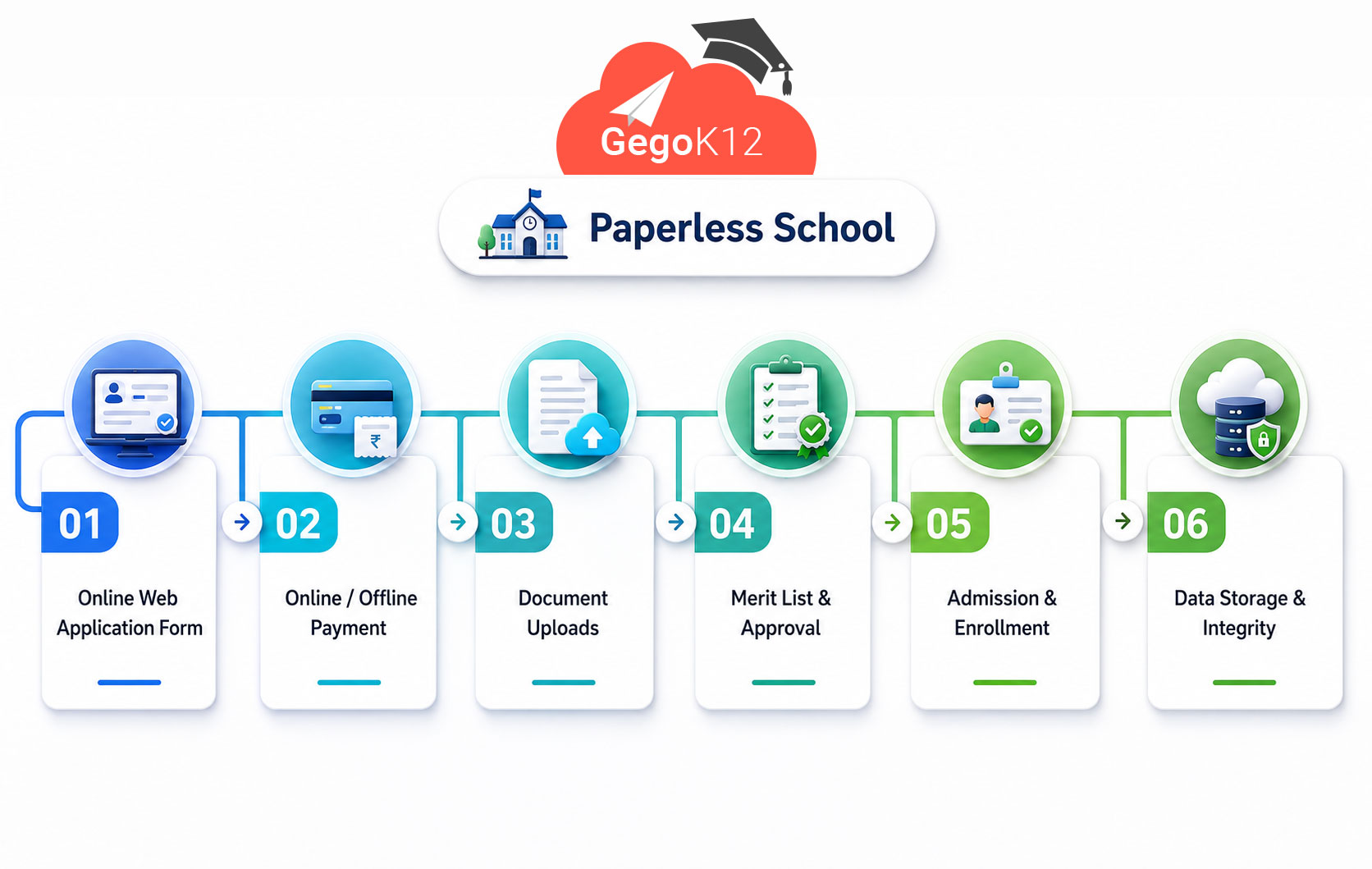
Five stages, and the family moves itself through the first three. The office only steps in where judgement is actually required — verifying a payment, checking documents, and making the decision.
- 01 Admissions open When the season starts, the administrator opens the admissions module. That publishes a public application link, which the school shares from its own website. Parents go straight to the form — no account to create first, and nobody has to be at the office to hand one out.
- 02 Application and payment The family completes a five-step form, which captures and stores everything in one go. At the end they pay the application fee online — or, if the family would rather pay at the school office, the office issues a payment code and the family uses it to complete the submission. Cash-paying parents are not shut out of an online process.
- 03 Documents Once the payment is verified and the application clears first-level screening, the family receives a link to upload what the school needs: birth certificate, ID cards, report cards and photographs. Documents arrive attached to the right application, rather than as eleven photos in a WhatsApp thread.
- 04 Approval The school verifies the uploaded documents and runs its interview or evaluation. An administrator — or a staff member holding the admissions coordinator role — then admits or rejects the applicant. The enrollment number is created at the moment of admission.
- 05 Enrollment The applicant is now a student, enrolled in a class. The enrollment number and details are sent to the family, along with login credentials for the mobile app, generated automatically. This is the step schools currently do twice, by hand, in June.

What the module does
Everything an online admission system needs to run a season, and all of it in the free core. There is no admissions tier, no applicant allowance and nothing that switches off when the season ends.
- Admission window opened and closed by the administrator
- Public application link to share from the school website
- Five-step online application form for parents
- Online payment of the application fee
- Offline payment at the office, completed with a payment code
- First-level screening before documents are requested
- Document upload link sent to the family
- Birth certificate, ID cards, report cards and photographs collected
- Manual verification of uploaded documents
- Interview and evaluation stage before the decision
- Admissions coordinator role for staff who are not administrators
- Admit or reject, with the enrollment number created on admit
- Applicant converted to a student and enrolled in a class
- Enrollment details and mobile app credentials generated and sent
- Class and academic-year-wise application lists
- Search and filter across applications
- Export of applications to spreadsheet
- Application and seats-filled reporting
The four highlighted lines are the ones still to be checked against the admin panel. Confirm, correct or delete them before this page goes live.
What school admissions software actually changes
The gain from school admissions software is rarely the form itself. It is that six people stop keeping six versions of the same list, and that the work moves from chasing to deciding.
The season runs itself until a decision is needed
Publishing the link is the last thing management has to organise. Families find the form, complete it and pay without anyone at the school being involved. Staff time goes to interviews and verification — the parts that genuinely need a person — instead of handing out forms and answering the same three questions on the phone.
The office stops chasing people
Documents arrive attached to the application they belong to, because the family uploads them through their own link. No matching photographs to names, no folder of scans, no asking a parent for the birth certificate twice because the first copy went to somebody's personal phone.
Parents apply at eleven at night
Most parents cannot take a morning off to collect a form. They can fill in five steps on a phone after the children are asleep, pay the fee there and then, and — if paying cash suits them better — still finish online with a code from the office. Schools that make applying easy get more of it.
Typed once, and by the family
The name the parent enters is the name on the student record, the ID card and the certificate years later. Nobody transcribes it from a paper form into a spreadsheet and then into the ERP in June, which is where spelling errors and wrong dates of birth actually come from.
Every decision leaves a trail
Who verified the documents, who admitted the applicant and when is on the record, and staff only reach what their role allows — an admissions coordinator is not an administrator. When a parent asks why an application did not succeed, somebody can open it and answer. Reporting across a season is listed but not yet confirmed.
Nothing important lives in a paper file
Applications, payments and documents sit in one system rather than in a register, a WhatsApp group and a drawer. That matters most in the year nobody plans for: the admissions clerk leaves, or the office floods, and the school still has every application from the last five intakes.
Who this suits
Schools running a real admission season — a few hundred applications, interviews and a hard start date. The parts that hurt are collecting the fee, chasing documents and moving accepted families onto the register.
If admissions currently lives in a register, a WhatsApp group and one spreadsheet that only one person understands, this is the module to start with. It is free, so a school can try it without a purchase decision.
Admissions software is usually sold per applicant or per seat, which means a good year costs more. GegoK12 does not price that way. The module is free and the licence is not tied to numbers.
GegoK12 and subscription admissions software
Subscription admissions platforms are good products and they win on some of these rows. The honest summary: they cost more and own your data; they also take the running of the thing off your hands entirely.
| GegoK12 admissions | Typical subscription platform | |
|---|---|---|
| Cost of the module | Free, in the MIT-licensed core | Part of an annual subscription |
| Priced per applicant or student | No | Usually yes |
| Contract | None. Stop whenever you like, keep everything | Annual, often with an increase at renewal |
| Where applicant data sits | On your server, in your country, if you self-host | On the vendor's servers, wherever those are |
| Source code | Yours, on GitHub, under the MIT licence | Not available |
| Application fee | Online, or cash at the office with a payment code | Online only, as a rule |
| Feeds the student record | Yes — same system, no export and import | Only if it also runs your student records |
| Setup | You install it, or we host it for you | Nothing to install — a real advantage |
| Support | Community, or a paid plan from us | Included in the subscription |
| If you outgrow it | Change the code, or pay us to | Request a feature and wait |
Scroll the table sideways on a phone →
Frequently asked
Is the admissions module really free?
Can parents apply online themselves?
Does an accepted applicant become a student automatically?
How much does school admission management software normally cost?
How do families send us their documents?
Where is our applicant data stored?
Does it work for schools in the United States?
Can we collect the application fee through it?
Can we change how the admission form works?
What do we need to run it?
Is there a limit on how many applications we can take?
Building this on your own server? The open source page has the licence, the requirements and the install steps, and the code is on GitHub.
Take one admission through it
Open the demo, add an enquiry, turn it into an application and admit the child. It takes about four minutes and tells you more than this page can.