
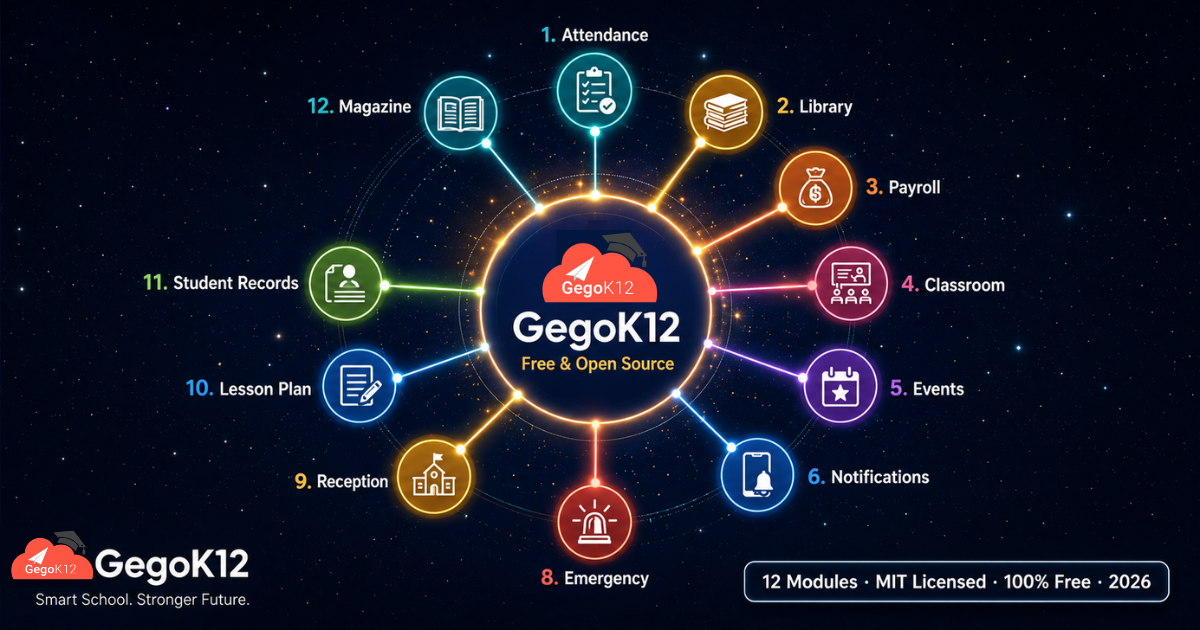
GegoK12 offers 12 genuinely free, open-source school management modules in 2026: Classroom Management, Student Information Management, Attendance Management, Calendar/Event & Gallery, Library Management, School Magazine & Journal Publishing, SMS/Push Notification, Facilities Management, Emergency Notification, Leave & Payroll Management, Lesson Plan, and Reception Module. All 12 are included in the core platform under the MIT licence with no licensing fees, fully integrated with each other, and deployable through self-hosting or managed cloud hosting.
Explore the complete module list →
Why Most Schools Never Discover How Much Is Actually Free
Most school administrators researching education technology in 2026 search one problem at a time. “Free attendance software.” “Free school library system.” “Free notification app for parents.” Consequently, they find scattered, single-purpose tools — one app for attendance, a different app for the library, a separate WhatsApp-based system for notifications — and they piece together a fragmented technology stack that never quite talks to itself.
What most of these administrators never discover is that a single platform already provides all of these capabilities, fully integrated, for free.
GegoK12 is a free and open-source school management system, MIT licensed, built on PHP and Laravel, developed by GegoSoft Technologies. Furthermore, it includes 12 genuinely free modules that cover the entire daily operational backbone of a K-12 school — not as 12 separate apps, but as 12 connected components of one unified system.
This guide maps every one of those 12 modules — what each does, how they interconnect, and most importantly, which one your school should deploy first based on your most urgent pain point right now.
The complete source code is available on GitHub for any school or developer to deploy, inspect, and customise at zero cost.
The 12 Free Modules: A Complete Map
1. Classroom Management — The Structural Foundation
Every school ERP needs a foundation, and GegoK12’s Classroom Management module is exactly that — defining classes, sections, and teacher assignments that every other module references. Without this structure properly configured, attendance, lesson planning, and communication all operate with gaps. Consequently, this is the module most schools configure first.
Core capabilities: Class and section definition, class teacher assignment, subject-teacher mapping, mobile app sync, multi-year data continuity.
📖 Deep dive: Free Classroom Management Software for Schools 2026
2. Student Information Management — The Data Spine
If Classroom Management is the foundation, Student Information Management is the data spine that every academic and administrative process depends on. Every student’s complete record — admission details, academic history, attendance, fee status, transport assignment, library activity — lives here as a unified profile.
Core capabilities: 360° student profiles, digital admissions, academic record tracking, role-based access, alumni archival.
📖 Deep dive: Free Student Information Management System 2026
3. Attendance Management — The Daily Operational Heartbeat
Attendance happens every single school day, multiple times per class. GegoK12 digitises this entirely — daily, session-based, or subject-wise marking, completed in under 30 seconds per class, with instant parent alerts and real-time analytics for at-risk student identification.
Core capabilities: Multi-mode attendance marking, staff attendance, automated parent alerts, chronic absenteeism flagging.
📖 Deep dive: Free Attendance Management System for Schools 2026
4. Calendar, Event & Gallery — The Community Connection Layer
School events define institutional culture, and this module manages the complete lifecycle — from a unified school calendar with clash-free scheduling, through automated multi-level reminders, to a permanent digital gallery that preserves event memories indefinitely.
Core capabilities: Unified calendar, automated reminders, class-targeted event notices, permanent photo and video gallery.
📖 Deep dive: Free School Event Management System 2026
5. Library Management — The Knowledge Hub Infrastructure
A school library generates significant value only when it is properly managed. GegoK12’s Library module replaces handwritten registers with a searchable digital catalogue, automated overdue reminders, instant fine calculation, and complete book journey tracking.
Core capabilities: Digital catalogue, barcode issuing and returns, automated fine calculation, usage analytics.
📖 Deep dive: Free School Library Management System 2026
6. School Magazine & Journal Publishing — The Creative Legacy Platform
Student creativity deserves permanence. This module replaces costly, fragile, annual print magazines with unlimited digital editions — preserving poems, essays, and artwork permanently while eliminating printing costs entirely.
Core capabilities: Multi-format uploads, custom categorisation, instant parent notifications, permanent archival.
📖 Deep dive: Free School Magazine Publishing Software 2026
7. SMS / Push Notification — The Communication Delivery Engine
Every other module in GegoK12 needs a way to reach parents and staff — and this module is the delivery mechanism. Instant push notifications and SMS alerts, role-based targeting, scheduled publishing, and a permanent searchable communication archive.
Core capabilities: Multi-channel delivery, class-targeted notices, scheduled publishing, digital archive.
📖 Deep dive: Free School Notification System for Parents 2026
8. Facilities Management — The Campus Health System
A school’s physical environment directly affects student health and learning quality. This module shifts campus management from reactive repairs to proactive, scheduled maintenance — covering classrooms, labs, sanitation facilities, playgrounds, and kitchens.
Core capabilities: Preventive maintenance scheduling, digital repair requests, sanitation tracking, compliance record management.
📖 Deep dive: Free School Facilities Management Software 2026
9. Emergency Notification — The Crisis Response System
In any school emergency, the speed and completeness of communication determines whether the response is controlled or chaotic. This module delivers instant, multi-channel mass alerts — reaching every parent in seconds rather than the 20-45 minutes a manual phone tree typically requires.
Core capabilities: Instant mass alerts, pre-set crisis templates, two-way acknowledgment, ISO 9001 compliant archival.
📖 Deep dive: Free Emergency Notification System for Schools 2026
10. Leave & Payroll Management — The Staff Trust Engine
Payroll errors damage staff trust more than almost any other administrative failure. This module automates the complete payroll cycle — attendance-linked salary calculation, PF/ESI/TDS compliance, digital payslips, and leave application workflows.
Core capabilities: Automated salary processing, statutory compliance, digital payslips, leave management workflow.
📖 Deep dive: Free School Payroll Management Software 2026
11. Lesson Plan — The Teaching Preparation System
Effective teaching depends on effective planning, and this module digitises the entire process — structured unit and topic planning, real-time syllabus completion tracking on mobile, and full reusability across academic years.
Core capabilities: Digital planning from anywhere, syllabus tracking, multi-year plan reuse, departmental collaboration.
📖 Deep dive: Free Lesson Plan Software for School Teachers 2026
12. Reception Module — The Front Desk Transformation
The reception desk is every visitor’s first experience of the school, and this module turns it from a chaotic paper-based pressure point into an organised digital hub — visitor logs, gate passes, appointment scheduling, and call tracking.
Core capabilities: Digital visitor registration, QR-based gate passes, appointment scheduling, call tracking.
📖 Deep dive: Free School Reception Management Software 2026
How the 12 Modules Work as One System — Not 12 Separate Tools
The genuine power of GegoK12 emerges not from any single module, but from how completely they interconnect. Consider a single school day, traced through the platform:
A student’s attendance, marked in Attendance Management, instantly updates their profile in Student Information Management and triggers a notification through SMS/Push Notifications. Meanwhile, their class structure — defined in Classroom Management — determines exactly which parents receive that notification. Their teacher’s lesson for the day, planned in advance through Lesson Plan, references the same class structure. After school, the student visits the Library, borrows a book, and the system automatically calculates a return date based on rules the librarian configured once.
Furthermore, that evening, the school publishes an event notice through Calendar, Event & Gallery for the upcoming Annual Day — and the same notification engine alerts every parent. A maintenance issue flagged earlier in the day through Facilities Management gets assigned and tracked, while the Reception desk logs three visitor appointments for tomorrow, each triggering an automated reminder. At month’s end, the Leave & Payroll module calculates every staff member’s salary based on attendance data that flowed in automatically all month — with zero manual reconciliation. Meanwhile, if any emergency had arisen on any of these days, the Emergency Notification system stood ready to reach every stakeholder within seconds. Finally, the term’s best student essays compile into the next Magazine edition, ready for permanent digital publication.
This is the difference between 12 separate apps and one integrated platform. No other free tool — and very few paid ones — achieve this level of operational coherence.
Module Comparison: What Each One Solves
| Module | Primary Problem Solved | Who Uses It Most |
|---|---|---|
| Classroom Management | Disorganised class structure and teacher assignments | Administrators, IT teams |
| Student Information Management | Fragmented, inaccessible student records | Principals, admissions officers |
| Attendance Management | Manual, error-prone daily attendance marking | Class teachers, parents |
| Calendar, Event & Gallery | Disconnected event planning and lost memories | Event coordinators, parents |
| Library Management | Untracked books and manual fine calculation | Librarians, students |
| Magazine & Journal Publishing | Expensive, fragile printed creative archives | Language and art teachers |
| SMS / Push Notification | Notices that never reach parents reliably | Administrative staff, parents |
| Facilities Management | Reactive, undocumented campus maintenance | Facilities managers, trustees |
| Emergency Notification | Slow, incomplete crisis communication | Principals, safety officers |
| Leave & Payroll Management | Manual payroll errors and compliance risk | HR administrators, all staff |
| Lesson Plan | Time lost to paper-based lesson planning | Subject teachers, HODs |
| Reception Module | Chaotic, undocumented front desk operations | Receptionists, visitors |
Which Module Should Your School Deploy First?
Rather than attempting to configure all 12 modules simultaneously, most schools achieve the strongest early results by sequencing deployment around their most urgent pain point. Use this decision guide:
If your biggest problem is parent communication failures → Start with SMS / Push Notification, since nearly every other module depends on it for delivery.
If your biggest problem is disorganised student records → Start with Student Information Management, since it is the data foundation every other module references.
If your biggest problem is manual attendance marking → Start with Attendance Management, the highest-frequency daily task in any school.
If your biggest problem is payroll errors and staff trust issues → Start with Leave & Payroll Management, since salary accuracy directly affects staff retention.
If your biggest problem is campus safety and maintenance gaps → Start with Facilities Management alongside Emergency Notification together, since both address physical safety.
If your biggest problem is a chaotic front desk → Start with the Reception Module, since first impressions shape every subsequent parent relationship.
However, regardless of where a school starts, the Classroom Management module should typically be configured early, since it forms the structural foundation that several other modules reference.
What These Modules Have in Common: The GegoK12 Philosophy
Across all 12 free modules, several consistent principles emerge that define the platform’s overall approach.
Genuinely free, not freemium. None of these 12 modules carry hidden licensing fees, per-user charges, or feature paywalls. The MIT licence permits unrestricted use, modification, and self-hosted deployment indefinitely.
Built for integration, not isolation. Every module is designed from the outset to share data with every other module — eliminating the data silos that plague schools using a patchwork of disconnected single-purpose tools.
Mobile-first throughout. Teachers, parents, administrators, and even drivers and conductors access GegoK12 through dedicated mobile apps — recognising that 2026 school stakeholders expect smartphone-native experiences.
Self-hosting for data sovereignty. Schools that deploy GegoK12 on their own infrastructure retain complete control over student data, staff records, and financial information — never dependent on a third-party commercial platform’s data policies.
Open source for permanent customisation. The full codebase, available on GitHub, means schools and developers can adapt any module to specific institutional requirements without vendor restriction.
Beyond the Free Modules: What Else GegoK12 Offers
While this guide focuses on GegoK12’s 12 genuinely free modules, the platform also offers premium modules covering Video Lecture Rooms, Online Quizzes, Fee Management, Timetable Generation, Exam Scheduling, Certificate Generation, Private Chat, School Bus Management, Inventory Management, and Alumni Management. These extend the platform’s capability for schools requiring more advanced functionality. Furthermore, the GegoK12 pricing page details exactly which capabilities fall into the premium tier, ensuring complete transparency before deployment decisions.
This guide deliberately focuses on the 12 modules that carry zero cost — giving schools a clear, accurate picture of what is genuinely free before considering any premium expansion.
Getting Started: Your Complete 2026 Deployment Roadmap
Step 1 — Access the platform. Fork or download the complete GegoK12 GitHub repository. MIT licensed and free to self-host, with managed cloud hosting available for schools preferring a hands-off deployment.
Step 2 — Read the documentation. The official GegoK12 documentation provides setup guides for every module — server requirements, configuration steps, and integration settings.
Step 3 — Watch the complete tutorial series. The GegoK12 YouTube playlist covers every module with dedicated walkthrough videos.
Step 4 — Book a comprehensive demo. Schedule a free demo session with the GegoK12 school tech advisors, who can walk through all 12 free modules and help you sequence deployment based on your school’s specific priorities.
Step 5 — Deploy your priority module first, then expand. Use the decision guide above to identify your starting point. Configure that module thoroughly, train your staff, and measure the operational improvement before expanding to the next module in your sequence.
Frequently Asked Questions
Q: How many modules in GegoK12 are actually free?
GegoK12 offers 12 genuinely free modules: Classroom Management, Student Information Management, Attendance Management, Calendar/Event & Gallery, Library Management, School Magazine & Journal Publishing, SMS/Push Notification, Facilities Management, Emergency Notification, Leave & Payroll Management, Lesson Plan, and Reception Module. All 12 are included in the core open-source platform at zero licensing cost.
Q: Can I use just one module without deploying the entire platform?
While GegoK12 is designed as an integrated platform, schools can prioritise configuring specific modules first based on urgent needs, expanding to additional modules over time as operational priorities evolve.
Q: Do all 12 free modules work together automatically?
Yes. Because all modules share the same underlying student, staff, and class data structures, information flows between them automatically — attendance data informs payroll, student profiles populate magazine contributor details, and classroom structures determine notification targeting.
Q: Is self-hosting required, or is there a hosted option?
Schools can choose either path. Self-hosting on a school’s own server or cloud infrastructure carries zero software licensing cost. Alternatively, GegoK12 offers managed hosting plans for schools preferring infrastructure support — though the software itself remains free regardless of hosting choice.
Q: How does GegoK12 compare to paying for 12 separate single-purpose apps?
Beyond the direct cost savings, the integration advantage is substantial. Twelve separate apps require twelve separate logins, twelve disconnected data sets, and constant manual reconciliation between systems. GegoK12’s unified platform eliminates this fragmentation entirely.
One Platform. Twelve Free Modules. Zero Reason to Wait.
In 2026, the gap between schools that operate on integrated digital systems and those still managing operations through paper, spreadsheets, and disconnected apps is widening every term. GegoK12 closes that gap completely — offering 12 genuinely free, deeply integrated, open-source modules that cover the daily operational core of any K-12 institution.
Every module in this guide is free. Every module connects to every other module. And every school, regardless of size or budget, can deploy this entire system starting today.
Explore the Complete GegoK12 Platform — Starting Today
| What You Need | Where to Go |
|---|---|
| 📂 Free open-source code | GegoK12 on GitHub |
| 📖 Complete documentation | Official Documentation |
| 🎥 Full tutorial series | GegoK12 YouTube Playlist |
| 🖥️ Complete module directory | All GegoK12 Modules |
| 🎓 Comprehensive platform demo | Book Your Free Demo Session |
The Complete Free Module Library — All 12 Articles
- Free Classroom Management Software for Schools 2026
- Free Student Information Management System 2026
- Free Attendance Management System for Schools 2026
- Free School Event Management System 2026
- Free School Library Management System 2026
- Free School Magazine Publishing Software 2026
- Free School Notification System for Parents 2026
- Free School Facilities Management Software 2026
- Free Emergency Notification System for Schools 2026
- Free School Payroll Management Software 2026
- Free Lesson Plan Software for School Teachers 2026
- Free School Reception Management Software 2026