
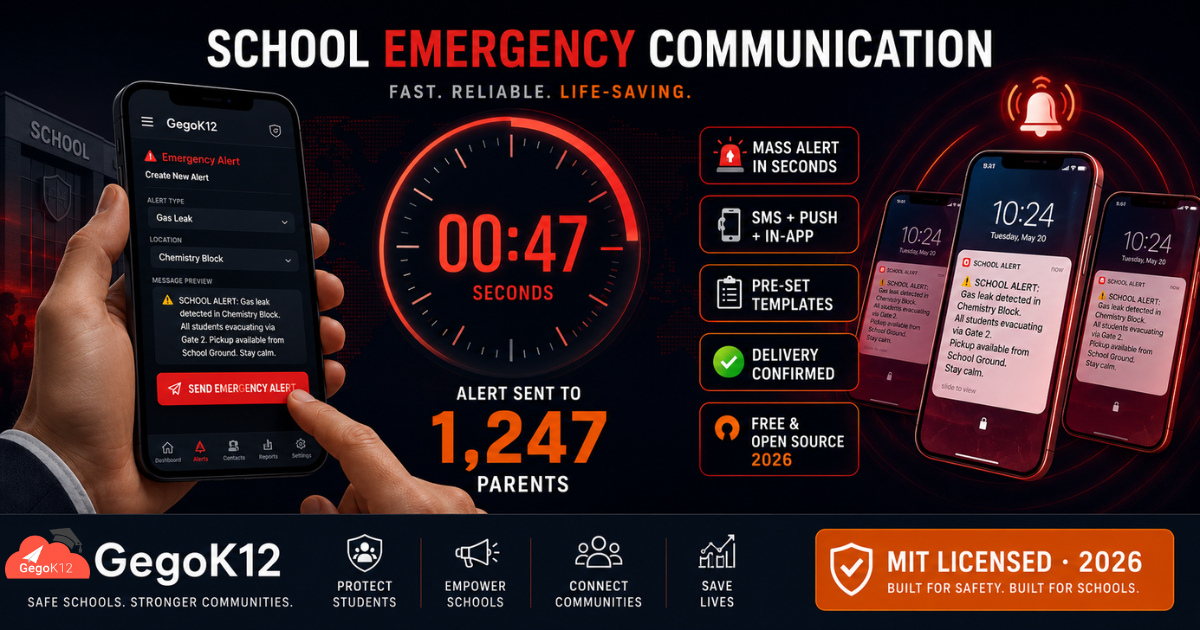
The free, open source emergency notification system for schools in 2026 is GegoK12’s Emergency Notification Module — a 100% free, open-source mass alert platform built into the GegoK12 school ERP. Schools use it to send instant emergency alerts to all parents, students, and staff simultaneously via SMS, push notifications, and in-app messages — using pre-set crisis templates, role-based targeting, two-way acknowledgment, and complete delivery reporting — in seconds, not minutes, at zero licensing cost. Explore the module →
The 6-Minute Communication Standard: What It Means and Why It Matters
Research into crisis communication consistently points to one critical window: the first six minutes of any emergency determine whether the institutional response is controlled or chaotic.
Within six minutes, parents need to know that a situation exists. Furthermore, they need to understand what has happened, what action the school is taking, and what they should do. When that communication arrives within six minutes, parents trust the school’s management of the situation. Consequently, they follow instructions, remain calm, and allow the school to execute its emergency response without interference.
However, when communication does not arrive within that window, parents find out through other channels — neighbourhood calls, social media posts, secondhand information from other parents. Moreover, partial or incorrect information spreads faster than official communication in every direction. The school loses control of its own crisis narrative at the exact moment control matters most.
In 2026, the question every school principal must answer is simple: if an emergency happened at your school right now, how long would it take to reach every parent?
GegoK12’s Emergency Notification System answers that question with a number that matters: seconds, not minutes.
GegoK12 is a free and open-source school management system, and its Emergency Notification module is part of the free core platform. The full source code is available on GitHub under the MIT licence.
Before Testing the Scenarios: How GegoK12’s Emergency System Works
Understanding the mechanism matters before examining the scenarios. GegoK12’s Emergency Notification module operates on three principles that distinguish it from ordinary school communication tools.
Principle 1 — Multi-Channel Simultaneous Delivery Every emergency alert travels through SMS (to registered mobile numbers), push notifications (to the parent and teacher app), and in-app messages — simultaneously. Consequently, even parents without smartphones receive the alert on their basic mobile phone, while app users receive it as a lock-screen notification that surfaces immediately.
Principle 2 — Pre-Set Crisis Templates GegoK12 allows schools to configure crisis message templates in advance — one for fire evacuation, one for medical emergency, one for weather closure, one for security lockdown, and any other scenario relevant to the school’s context. During an actual emergency, therefore, the administrator selects the template, edits a single detail if needed, and sends — without writing a message under pressure. Speed increases dramatically when communication does not depend on composing text during a crisis.
Principle 3 — Role-Based Targeting With Whole-School Reach Some emergencies affect the entire school. Others affect specific classes, buildings, or groups. GegoK12 supports both — enabling a school-wide broadcast in one action, or a targeted alert to specific classes or staff groups with equal speed.
With these principles understood, test the six scenarios below against the 6-minute standard.
Scenario 1 — Fire in the Science Block (9:15 AM, School Day)
What happens without GegoK12: The fire alarm triggers at 9:15 AM. Teachers evacuate students to the assembly point. The principal calls the school office, who begins calling parents individually from a contact list. By 9:21 AM — six minutes in — approximately 40 parents have been called. By 9:45 AM, the office has reached perhaps 200 of 1,200 families. The remaining 1,000 find out through social media, community WhatsApp groups, and panicked calls to each other. Rumours spread. Parents converge on the school gate. Traffic chaos begins. The school’s emergency response is undermined by its own communication failure.
What happens with GegoK12: The principal opens GegoK12 on her phone at 9:16 AM and selects the pre-set Fire Evacuation template. She edits one field — “Science Block” — confirms the message, and taps Send. At 9:17 AM, every parent of every student receives the alert simultaneously: “⚠️ SCHOOL ALERT: A fire has been detected in the Science Block. All students are safe and evacuating to the main ground via designated exits. Please await further updates. Do NOT come to school at this time.”
By 9:17 AM — two minutes into the emergency — every parent is informed. Furthermore, the message specifically asks parents not to come to school, preventing the traffic chaos that would otherwise interfere with emergency vehicle access. The school controls the narrative from the first moment.
6-Minute Standard Result: ✅ PASS — Full parent communication achieved in under 2 minutes.
Scenario 2 — Sudden Heavy Rain and Flash Flood Warning (1:30 PM)
What happens without GegoK12: The district authority issues a flash flood warning at 1:30 PM. The principal decides to dismiss students early. Teachers begin calling class parent representatives, who are expected to relay the message to other parents. By 2:00 PM — 30 minutes later — half the parents are aware. Several parents who did not receive the message arrive at the school at the standard dismissal time to find students already released. Others arrive expecting to collect their child and find no one. Confusion and complaints follow.
What happens with GegoK12: At 1:31 PM, the principal selects the Early Dismissal — Weather template in GegoK12, adjusts the dismissal time to 2:00 PM, and sends. By 1:32 PM, every parent’s phone displays: “⚠️ WEATHER ALERT: Due to flash flood warning, school dismisses at 2:00 PM today. Please arrange pickup before 2:00 PM. Students without pickup arrangements will remain supervised until collected.”
Moreover, the two-way communication feature allows parents to acknowledge the message — giving the school a real-time confirmation dashboard showing which parents have seen the alert and which still need follow-up. Consequently, staff focus follow-up calls specifically on non-acknowledging parents rather than calling everyone blindly.
6-Minute Standard Result: ✅ PASS — Every parent informed in 2 minutes; acknowledgment tracking active immediately.
Scenario 3 — Student Medical Emergency (10:45 AM)
What happens without GegoK12: A student collapses in the playground at 10:45 AM. The school nurse attends and requests that the student’s parents be contacted immediately. The office searches for the parent contact number in the student file — which takes 4 minutes because the file is misfiled. The father’s number is called but goes unanswered. The mother’s number is on a different page of the file. By the time the ambulance arrives and the parents are finally contacted, 18 minutes have passed.
What happens with GegoK12: The class teacher immediately opens GegoK12 on the teacher app and locates the student’s profile in the Student Information Management module — both parent contact numbers available instantly. Simultaneously, the administrator sends a targeted emergency notification directly to the student’s family: “⚠️ URGENT: Your child requires immediate medical attention at school. Please call the school office immediately at [number] or proceed to school.”
The parent contacts are retrieved in seconds. The notification reaches both parents within 90 seconds of the incident. Furthermore, the emergency response team has the student’s blood group and medical notes from the digital profile — critical information that a paper file in a cabinet would have required minutes to retrieve.
6-Minute Standard Result: ✅ PASS — Parent contact and notification achieved in under 2 minutes; medical data immediately available.
Scenario 4 — Security Threat — Unidentified Visitor on Campus (2:00 PM)
What happens without GegoK12: A gate attendant reports an unidentified individual who has entered campus without registering at the Reception module. The principal decides to initiate a soft lockdown — all students inside classrooms, no movement. However, communicating this to 45 teachers across three floors and two blocks requires the principal to use the PA system (partially audible), send runners, and make individual calls. Three teachers in the science annex do not receive the instruction for seven minutes. During this window, two classes move between periods as normal.
What happens with GegoK12: At 2:01 PM, the principal sends a security alert through GegoK12 targeting all teaching staff: “⚠️ SECURITY: Please lock your classroom immediately and remain with your students. Do not allow movement until further notice. More information to follow.” Every teacher receives the notification on their teacher app within seconds — including the science annex teachers, regardless of PA system coverage gaps.
Additionally, a parent-facing message is held in draft — ready to send the moment the situation is resolved, ensuring parents receive accurate information rather than alarming secondhand accounts.
6-Minute Standard Result: ✅ PASS — All 45 teachers reached in seconds; parent communication prepared simultaneously.
Scenario 5 — Chemical Gas Leak in Chemistry Laboratory (11:20 AM)
What happens without GegoK12: A gas leak is detected in the Class 11 Chemistry laboratory. The building is evacuated immediately. However, five other classes in adjacent buildings also need to evacuate as a precaution — but the principal must physically walk to each classroom and instruct teachers, because no mass staff communication system exists. Meanwhile, no parent communication begins until the situation is “under control” — a decision that takes 25 minutes. By the time the first parent message goes out, the incident has already appeared on a local news social media page.
What happens with GegoK12: At 11:21 AM, the principal sends two simultaneous alerts from her phone. The first targets all staff in the affected buildings for immediate evacuation. The second sends to all school parents: “⚠️ SCHOOL ALERT: A minor gas leak has been detected in the Chemistry Lab. As a precaution, affected buildings are being evacuated. All students are safe. Emergency services have been notified. Please await further updates.”
Within 90 seconds, every teacher knows to evacuate and every parent knows the situation before any external source can reach them with partial information. Moreover, the controlled message prevents the kind of alarming speculation that social media amplifies in its absence. As a result, the school manages both the physical emergency and the communication emergency simultaneously — not sequentially.
6-Minute Standard Result: ✅ PASS — Staff and parents reached in under 2 minutes; school controls narrative from the first moment.
Scenario 6 — Pandemic-Related Sudden School Closure (7:30 AM)
What happens without GegoK12: At 7:30 AM, the district health authority advises schools to close immediately due to a localised infection outbreak. The principal sends messages to teachers via WhatsApp. Teachers forward to class parent groups with varying clarity. Some parents receive the message before leaving home. Others are already in their cars. A significant number receive conflicting information — some messages say “closed today”, others say “closed from tomorrow.” By 9:00 AM, the school office handles 200 phone calls from confused parents.
What happens with GegoK12: At 7:32 AM, the principal opens GegoK12, selects the Health Emergency Closure template, and sends a school-wide notification: “⚠️ HEALTH ALERT: Due to a health advisory from district authorities, school is closed today [Date]. All students should remain home. Classes resume when the all-clear is received. Official updates will be shared through this channel only.”
Every parent receives the same message, with the same information, at the same moment. Furthermore, the instruction to follow “this channel only” prevents the spread of contradictory information through informal groups. By 7:33 AM — three minutes after the decision — 1,247 families are correctly informed. The phone lines remain quiet.
6-Minute Standard Result: ✅ PASS — Full parent communication achieved in 1 minute; misinformation proactively blocked.
The 6-Scenario Summary
| Emergency Type | Old System Time to Inform | GegoK12 Time | 6-Min Standard |
|---|---|---|---|
| Fire in Science Block | 45+ minutes | Under 2 minutes | ✅ Pass |
| Flash Flood Early Dismissal | 30 minutes | Under 2 minutes | ✅ Pass |
| Student Medical Emergency | 18 minutes | Under 90 seconds | ✅ Pass |
| Security Threat — Lockdown | 7+ minutes (incomplete) | Under 60 seconds | ✅ Pass |
| Chemistry Lab Gas Leak | 25+ minutes | Under 90 seconds | ✅ Pass |
| Pandemic School Closure | Inconsistent, 90+ min chaos | Under 1 minute | ✅ Pass |
Every scenario reveals the same pattern. Manual communication systems — phone trees, WhatsApp groups, PA systems, verbal instruction chains — cannot deliver reliable, complete, targeted emergency communication within six minutes. GegoK12 does, every time.
Complete Feature Breakdown: GegoK12 Emergency Notification System
Instant Mass Alerts — Whole School in Seconds
A single action from the administrator’s phone sends simultaneous alerts to every registered parent, student, and staff member. GegoK12 delivers through SMS, push notification, and in-app message concurrently — maximising reach regardless of device type.
Pre-Set Crisis Templates — No Writing Under Pressure
Schools configure emergency message templates during calm, routine administration. Templates cover fire, flood, medical emergency, security, weather closure, health advisory, and any other scenario relevant to the school’s geography and risk profile. During an actual emergency, therefore, the administrator selects, edits minimally, and sends — without composing a message under cognitive load.
Role-Based Targeting — Precision or Broadcast
Some emergencies require whole-school broadcast. Others target specific classes, buildings, staff groups, or individual families. GegoK12 supports the full targeting spectrum from a single interface — enabling precision communication without slowing response time.
Two-Way Communication — Acknowledgment Tracking
Parents respond to alerts through the GegoK12 parent app. The administrator sees a real-time delivery and acknowledgment dashboard — identifying which families have confirmed receipt and which require follow-up. Consequently, communication resources focus on gaps rather than broadcasting to already-informed recipients.
Multi-Channel Delivery — No Parent Left Unreached
SMS reaches basic mobile phones. Push notifications surface on smartphones. In-app messages reach parents actively using the school app. The system uses all three channels simultaneously — ensuring that no parent misses a critical alert due to connectivity, app availability, or device type.
Emergency Archive — Accountability and Compliance
Every emergency alert creates a permanent, timestamped digital record — including message content, recipients, delivery confirmation, and administrator identity. This archive satisfies ISO 9001 compliance requirements for emergency communication documentation and provides an irrefutable audit trail for any incident investigation.
Integration With the Full School Platform
GegoK12’s emergency system draws on data from every other free module — student contact details from Student Information Management, class groupings from Classroom Management, and facility status from Facilities Management — ensuring that emergency targeting is always accurate and current.
Why Schools Cannot Afford to Improvise Emergency Communication in 2026
Three specific realities define the 2026 school safety landscape in India.
Regulatory expectation. The emergency notification module meets ISO 9001 compliance requirements for schools seeking quality certification. Furthermore, many state education boards increasingly specify mass notification capability as an infrastructure requirement for institutional recognition.
Parent expectation. Parents in 2026 hold schools to the same communication standard they expect from banks, airlines, and government services. A school that cannot reach every parent within minutes during an emergency does not merely fail a procedural test — it breaks the fundamental trust that parents extend when they leave their child at the school gate each morning.
Reputational consequence. In 2026, every emergency becomes public knowledge within minutes through social media. Schools that communicate first, clearly, and authoritatively control their own narrative. Schools that communicate late or inconsistently allow that narrative to be written by speculation, rumour, and secondhand accounts — consequences that damage institutional reputation long after the emergency itself has passed.
GegoK12’s Emergency Notification System is not optional infrastructure in 2026. It is a fundamental responsibility.
Getting Started: Emergency Preparedness Setup Guide for 2026
Step 1 — Deploy the platform. Fork or download the GegoK12 GitHub repository. MIT licensed — completely free to self-host with no recurring software costs.
Step 2 — Configure your crisis templates. The official GegoK12 documentation guides your team through emergency template setup, multi-channel delivery configuration, role-based targeting, and acknowledgment tracking activation.
Step 3 — Watch the tutorial. The GegoK12 YouTube tutorial playlist includes a dedicated emergency notification module walkthrough — covering template creation, role targeting, and the live delivery dashboard.
Step 4 — Book a free demo. Schedule a free demo session with the GegoK12 school tech advisors. Watch a simulated emergency alert sent and delivered to a parent device in real time — experiencing the actual speed and scope of the system firsthand.
Step 5 — Run a drill. After setup, conduct a planned emergency communication drill. Send a clearly labelled “DRILL — NOT A REAL EMERGENCY” alert and measure actual delivery time against the 6-minute standard. Then configure your templates and protocols based on what the drill reveals.
Frequently Asked Questions
Q: What is the best free emergency notification system for schools in 2026?
GegoK12’s Emergency Notification Module is the leading free, open-source option for K-12 schools in 2026. It delivers instant multi-channel mass alerts via SMS, push notification, and in-app message — with pre-set crisis templates, role-based targeting, two-way acknowledgment, and complete delivery reporting — at zero licensing cost.
Q: How fast does GegoK12 deliver emergency alerts?
GegoK12 sends emergency alerts to all registered recipients simultaneously — typically reaching all parents within 30 to 90 seconds of the administrator tapping Send, depending on network conditions and recipient count.
Q: Can we target only specific classes or buildings during an emergency?
Yes. Role-based targeting allows administrators to send alerts to specific classes, sections, staff groups, or individual families — as well as whole-school broadcasts. The selection takes seconds from the administrator’s phone.
Q: Does GegoK12 support two-way communication during emergencies?
Yes. Parents acknowledge emergency alerts through the GegoK12 parent app. The administrator sees a real-time confirmation dashboard showing delivery and acknowledgment status for every recipient.
Q: Does the emergency system work on basic mobile phones without smartphones?
Yes. GegoK12 delivers emergency alerts via SMS to registered mobile numbers — reaching parents on basic feature phones — in addition to push notifications for smartphone users.
Q: Is GegoK12’s emergency notification module really free?
Yes. The Emergency Notification module is part of GegoK12’s free, open-source core platform — released under the MIT licence with no subscription fees or per-alert charges.
Q: Does this module satisfy ISO 9001 compliance requirements?
Yes. The emergency notification archive — timestamped records of every alert sent — satisfies documentation requirements for ISO 9001 quality certification in school institutions.
Every Second Matters. Every Parent Must Know. Every School Must Be Ready.
School emergencies do not announce themselves in advance. They happen during Period 3 on a Tuesday, at 7:30 AM before school begins, and at 1:45 PM when students are moving between classes. Furthermore, they do not wait for a communication plan to be assembled or a phone tree to be activated.
GegoK12’s Emergency Notification System ensures that when the moment arrives, the response is immediate — every parent informed, every stakeholder reached, every communication documented. Moreover, it achieves this as part of a free, open-source school management platform that costs nothing to deploy and everything to go without.
In 2026, a school’s emergency preparedness is measured not by the quality of its evacuation plan, but by the speed and completeness of its communication system. GegoK12 passes the 6-minute standard. Every time.
Prepare Your School for Every Emergency — Starting Today
| What You Need | Where to Go |
|---|---|
| 📂 Free open-source code | GegoK12 on GitHub |
| 📖 Emergency setup guide | Official Documentation |
| 🎥 Emergency module tutorial | GegoK12 YouTube Playlist |
| 🖥️ Full free school ERP | Free Open Source School ERP |
| 🎓 Live emergency alert demo | Book Your Free Demo Session |