
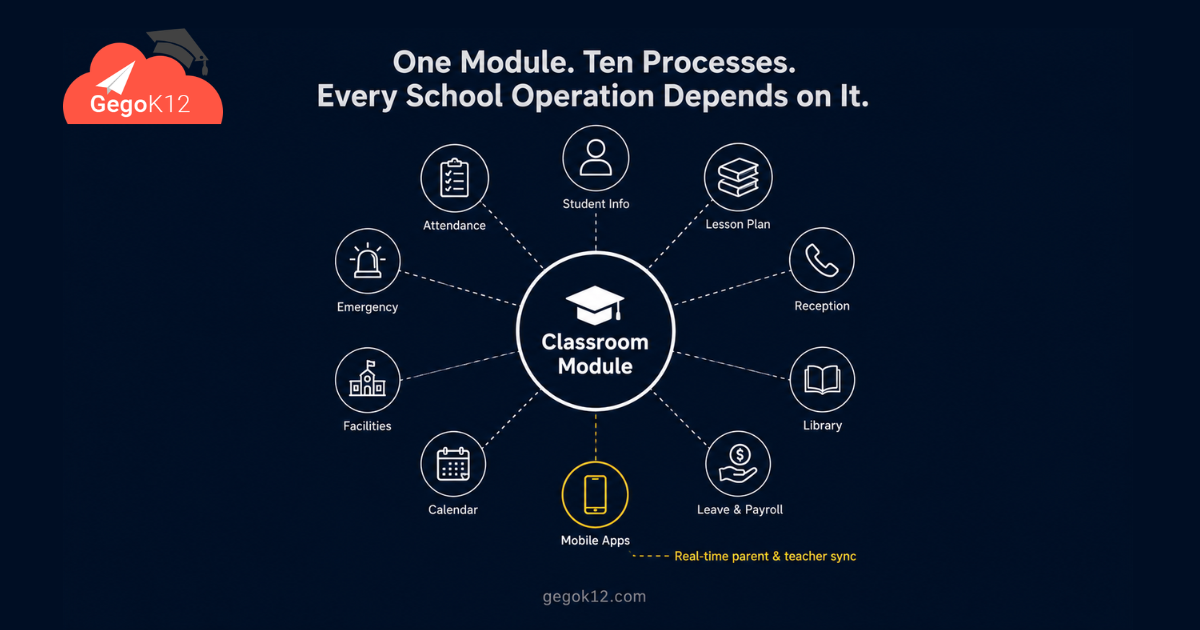
The best free open-source classroom management software for schools in 2026 is GegoK12’s Classroom Management Module — a 100% free, MIT-licensed module that forms the structural foundation of the GegoK12 school ERP. It enables schools to define class and section structures, assign class teachers and subject faculty, sync classroom data to parent and teacher mobile apps in real time, and anchor every subsequent school operation — from admissions to attendance to reporting — to a clean, reliable, year-on-year class-section framework. Zero cost. Full self-hosting support.
The Question Every School Administrator Needs to Answer
Before diving into features, take 60 seconds to answer these five questions about your school’s current classroom data structure.
1. Can you see, in real time, which teacher is responsible for every class and every subject across your entire school — right now, on one screen?
2. When a new academic year begins, does your classroom setup process take days of re-entry — or minutes of structured configuration?
3. Does every parent automatically receive homework notifications, attendance updates, and class announcements without any manual broadcast from a teacher?
4. When your school’s ERP processes admissions, schedules attendance, assigns homework, or plans exams — does it always know which class, which section, and which teacher each operation belongs to?
5. Are your classroom records from three years ago still accessible, searchable, and accurate today — without anyone having to rebuild them from memory?
If you answered “No” to even two of these questions, your school is operating without a solid classroom data foundation. Moreover, every other process built on top of that gap — attendance, reporting, parent communication — carries the same structural weakness.
GegoK12’s Classroom Management Module addresses every one of these gaps. Furthermore, it does so completely free, under the MIT licence, with full self-hosting support.
What Is GegoK12 — and Why Does Classroom Structure Matter So Much?
GegoK12 is a free and open-source school management system built on PHP + Laravel, MIT licensed, and designed exclusively for K-12 schools. The Classroom Management module is not just one feature among many — it is the structural spine from which every other process in the school ERP grows.
Think of it this way. When a school processes a student admission, the system needs to know which class and section the student joins. When a teacher marks attendance, the system needs to know which class they are marking it for. When a parent receives a homework notification, the system needs to know which class teacher sent it. When a principal generates a performance report, the system needs to know how to group students into meaningful academic units.
All of these operations depend on one thing: a well-defined, accurately maintained classroom structure. Consequently, the Classroom Management module is the first thing a school configures when deploying GegoK12 — and the accuracy of everything that follows depends on the quality of that initial setup.
The full platform is freely available on GitHub under the MIT licence.
The 5-Level Classroom Foundation: How GegoK12 Builds a School’s Academic Backbone
Think of GegoK12’s classroom management as a five-level foundation — each level more functional than a disconnected system, each level unlocking the next.
Level 1 — Defining Classes and Sections: The Academic Blueprint
Every school year begins with the same fundamental act: deciding how many classes exist, how many sections each class has, and what the naming conventions are. In most schools, this process happens informally — someone updates last year’s spreadsheet, deletes a few rows, adds a section, and sends it to the office printer.
However, in GegoK12, this process creates something far more valuable than a formatted table. Administrators use the Classroom Management module to formally define every class and section at the start of the academic year — establishing them as named, structured entities within the ERP system.
From that moment, every other module in the platform — Attendance Management, Student Information Management, Lesson Plan, Leave & Payroll Management, and the Library Management system — references these defined class units automatically. Consequently, there are no mismatched records, no ambiguous class names, and no data entry errors caused by inconsistent class labelling.
🏗️ Foundation Check: If your school currently uses different class naming conventions across different registers — “IX-A” in attendance, “9A” in the fee system, “Class 9 A” in the homework tracker — that inconsistency represents a structural crack that GegoK12 closes at setup.
Level 2 — Teacher Assignment: Accountability Without Ambiguity
Knowing which teacher is responsible for which class and which subject is one of the most fundamental pieces of operational information a school needs. Yet, in most schools, this information exists in the principal’s head, on a chart printed in the staff room, and on a WhatsApp message sent on the first day of term — in three potentially different versions.
GegoK12’s Classroom Management module establishes formal, system-level teacher assignments for every class and every subject:
- Class Teacher Assignment — each section has a designated class teacher, recorded in the system and visible to administrators, parents, and the teacher themselves
- Subject Teacher Mapping — each subject within each class is assigned to a specific teacher, creating a clear matrix of academic responsibility across the school
As a result, when a parent checks which teacher handles their child’s Mathematics, the parent app shows the answer instantly. Furthermore, when the principal needs to verify invigilator assignments before an exam, the system already holds the answer — no manual compilation required.
Additionally, if a teacher leaves mid-year or a reassignment becomes necessary, administrators update the mapping in minutes. The change reflects immediately across every connected module without disrupting existing historical data.
Level 3 — Mobile App Sync: Real-Time Connection Between School and Home
Once the class and teacher structure is defined, GegoK12 activates its most parent-facing capability: real-time mobile app synchronisation.
Every update that flows through a classroom — attendance marks, homework assignments, exam reminders, class notices — reaches parents and students through the GegoK12 parent app and teacher app automatically. Specifically:
- Parents receive instant notifications when a teacher publishes homework for their child’s class
- Attendance updates sync to the parent app immediately after a teacher marks the register
- Class-specific announcements and schedule changes reach parents before they even call the school
- Teachers access their class roster, attendance dashboard, and student profiles on their mobile app from anywhere
Moreover, because the app’s content is driven by the class-section structure defined in the Classroom Management module, each parent sees only information relevant to their own child’s class. Consequently, there is no generic broadcast — every notification is contextually appropriate and personally relevant.
Level 4 — Extracurricular and Participation Tracking
Academic performance is only part of a student’s school story. GegoK12’s Classroom Management module extends beyond academic structure to support participation tracking — recording student involvement in extracurricular activities, clubs, competitions, and events.
This matters for several reasons. Firstly, participation records build a richer student profile that complements academic data from the Student Information Management module. Secondly, schools in 2026 increasingly require evidence of holistic student development for board reporting, accreditation, and scholarship applications. Thirdly, parents who see their child’s extracurricular engagement documented alongside academics develop greater confidence in the school’s commitment to whole-child education.
Furthermore, class-level event integration connects with GegoK12’s Calendar, Event & Gallery module — ensuring every class activity appears on the school-wide calendar and reaches parents through the notification system automatically.
Level 5 — Multi-Year Data Continuity: The Institutional Memory Advantage
Perhaps the least celebrated but most strategically valuable feature of GegoK12’s Classroom Management module is its multi-year data continuity.
At the end of every academic year, administrators run the structured year-transition process — promoting students to the next class, reassigning teachers where necessary, and configuring the new academic year’s class structure. Critically, all historical data from previous years remains intact, searchable, and linked to the relevant students’ profiles.
This means a Class 12 student’s complete academic history — from Class 1 onward — is traceable within a single platform. Furthermore, when a board inspector requests historical attendance records or a scholarship committee asks for multi-year academic performance data, the school retrieves it instantly rather than searching through physical archives.
In 2026, institutional memory should be a system capability — not a human responsibility. GegoK12’s classroom structure makes that possible, year after year, at zero cost.
How the Classroom Module Powers Every Other Module in GegoK12
Understanding the classroom module in isolation misses its real significance. Consider how it connects to the rest of the platform:
| Module | How Classroom Data Powers It |
|---|---|
| Attendance Management | Daily registers auto-loaded per class and section — no manual roster creation |
| Student Information Management | Student profiles linked to their specific class-section unit from admission |
| Lesson Plan | Teachers plan curriculum per class based on their assigned subject mappings |
| Library Management | Library membership linked to class-section assignments for organised borrowing |
| Leave & Payroll Management | Staff class assignments inform period-based workload and salary calculations |
| SMS / Push Notifications | Class-targeted notifications reach only the relevant parents and students |
| Calendar, Event & Gallery | Class-level events published to the school-wide calendar through the module |
| Facilities Management | Classroom room assignments tracked and managed per class-section unit |
| Emergency Notification | Emergency alerts target specific classes or the whole school from the defined structure |
| Reception Module | Front desk access to class lists and teacher assignments for instant parent queries |
Without a properly configured classroom structure, none of these modules operate at full efficiency. Moreover, the quality of data flowing through every downstream process is only as good as the accuracy of the foundation that feeds it.
Who Benefits Most From a Properly Configured Classroom Foundation?
School Principals and Administrators gain a real-time, accurate view of every class, every teacher assignment, and every operational unit in the school — without asking anyone to compile a report. Decision-making becomes faster because the data is always current.
Class Teachers receive a clearly defined role and scope from day one of the academic year. Furthermore, they access their complete class roster, student profiles, and communication tools through the teacher app — without confusion about which students belong to their responsibility.
Subject Teachers benefit from precise subject-class assignments that eliminate ambiguity. In large schools with many parallel sections, this clarity prevents the timetable and attendance conflicts that arise when teacher-class mappings are informal.
Parents experience a more transparent and responsive school communication system. Because every notification connects to their child’s specific class structure, the information they receive is always contextually relevant — not generic broadcasts that may or may not apply.
Students, meanwhile, benefit from a school that knows their academic position precisely — which class they belong to, which teachers are responsible for which subjects, and how their progress connects to the broader class-level performance picture.
IT Teams and Developers work with a fully open-source codebase on GitHub — allowing them to customise the classroom structure, add custom fields, or build integrations with external academic planning tools, all without vendor restrictions.
Common Setup Mistakes Schools Make — and How GegoK12 Prevents Them
Over years of school ERP deployment, certain classroom data setup errors appear repeatedly. Understanding them helps schools avoid costly mid-year corrections.
Mistake 1: Inconsistent Class Naming Conventions Some schools label classes as “Grade 6”, “Std 6”, “Class VI”, and “6th” interchangeably across different registers. GegoK12’s structured setup enforces consistent naming from the start — one definition per class, referenced uniformly across all modules.
Mistake 2: Skipping Subject Teacher Mapping Many schools assign class teachers in the system but skip subject teacher mapping because it seems time-consuming at setup. However, this omission means the system cannot route subject-specific notifications, homework assignments, or attendance records to the correct teacher — creating operational gaps that accumulate through the year.
Mistake 3: Not Running the Year Transition Process Schools that skip the formal year-transition workflow in GegoK12 — simply editing class names rather than running the structured promotion and reset process — lose the clean historical data separation that makes multi-year reporting possible.
Mistake 4: Delaying Setup Until After Admissions Begin Setting up the classroom structure after admissions begin means early students have no class assigned — creating data gaps that are time-consuming to correct. GegoK12’s configuration guide specifically recommends completing classroom setup before opening admissions.
The official GegoK12 documentation covers each of these scenarios with specific guidance for avoiding and correcting them.
Getting Started: Your Classroom Setup Checklist for 2026
Before the next academic year begins, work through this structured checklist to build a solid classroom foundation in GegoK12.
- Step 1 — Deploy the platform. Download the GegoK12 open-source code from GitHub and deploy on your own server or cloud infrastructure. MIT licensed — completely free.
- Step 2 — Configure your academic year. Define the start and end dates, term structure, and school-wide academic calendar.
- Step 3 — Create your class and section structure. Define every grade from Class 1 to Class 12, with all sections, using a consistent naming convention.
- Step 4 — Assign class teachers. Map one class teacher to every section — creating formal, system-recorded accountability.
- Step 5 — Map subject teachers. Assign each subject to the appropriate teacher for every class — enabling accurate notifications, lesson plan alignment, and attendance routing.
- Step 6 — Verify mobile app sync. Confirm that the teacher app reflects updated class rosters and the parent app shows the correct class information for every student.
- Step 7 — Watch the tutorial. The GegoK12 YouTube playlist includes a dedicated classroom setup walkthrough — covering every configuration step in sequence.
- Step 8 — Book a demo. The GegoK12 team runs a free live demo session specifically covering classroom module setup for schools preparing for a new academic year.
Frequently Asked Questions
Q: What is the best free open-source classroom management software for schools in 2026?
GegoK12’s Classroom Management Module is the leading free, open-source option for K-12 schools in 2026. It provides structured class-section definition, formal teacher assignment mapping, real-time mobile app synchronisation, multi-year data continuity, and deep integration with every other school management function — at zero licensing cost.
Q: Does GegoK12’s classroom module work on mobile devices?
Yes. All classroom data syncs in real time to the GegoK12 teacher app and parent app — enabling teachers to manage their class from anywhere and parents to receive instant class-specific updates on their smartphones.
Q: How long does the classroom setup take at the start of a new academic year?
For most schools, the complete classroom setup — defining classes, creating sections, and mapping teachers — takes between 2 and 4 hours depending on the school’s size. The structured process replaces what many schools currently spend 2–3 days doing informally.
Q: What happens to classroom data from previous academic years?
All historical classroom data remains permanently stored and accessible in GegoK12. Furthermore, the year-transition process keeps previous year records intact while creating a clean new structure for the current year — enabling multi-year comparative reporting.
Q: Can subject teachers be reassigned mid-year without losing historical data?
Yes. Administrators reassign class or subject teachers at any point through the year. Historical data — attendance, lesson plans, performance records — remains linked to the original records rather than being overwritten.
Q: Is the classroom management module really free?
Yes. The Classroom Management module is part of GegoK12’s free, open-source core platform, released under the MIT licence. Schools deploy and use it with no licensing fees of any kind.
The Foundation Is the Strategy
In school ERP implementation, organisations frequently focus on the most visible features — parent apps, digital reports, communication dashboards. However, experienced school IT administrators understand that all of these depend entirely on the quality of the foundational data beneath them.
Gegok12’s Classroom Management Module provides that foundation. Clean class definitions. Unambiguous teacher assignments. Real-time mobile synchronisation. Multi-year data integrity. All completely free and open source.
In 2026, a school that builds its digital operations on a properly configured classroom structure is a school that makes every subsequent process faster, more accurate, and more reliable. GegoK12 makes that foundation achievable for every school — regardless of size or budget.